Voice chat
Talk to the players around you, right inside the game. Hold T to talk. No extra app, nothing to install.
Live in voice
Straight from the game server, every few seconds. = talking right now.
How to talk
Hold the key while you speak and let go when you're done. It never fires while you're typing in the chat box. You hear a soft click when the key goes down and up.
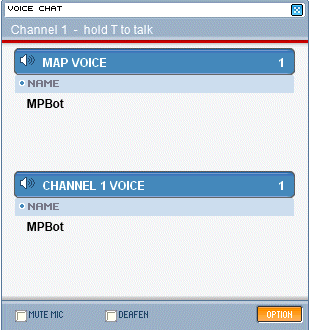
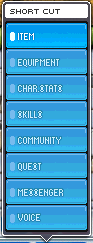
Or open SHORT CUT › VOICE. It shows who is in map voice and channel voice, who is talking, and has MUTE MIC, DEAFEN and the OPTION button.
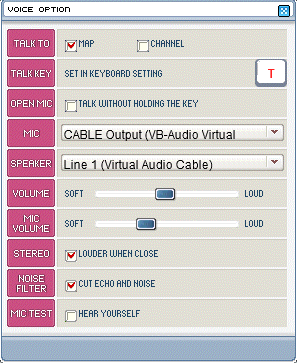
Pick who hears you (TALK TO Map or Channel), your MIC and SPEAKER, the volumes, and tick MIC TEST to hear yourself. Everything is saved on your PC.
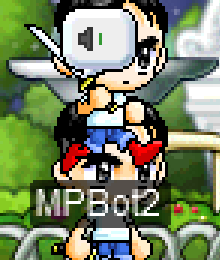
A speaker badge pops up over the head of whoever is talking on your map, and a green icon next to their name in the window.
Two rooms
Everyone on the same map and the same channel. With STEREO on, people standing close sound louder, and you hear them from the side of the screen they're on.
Everyone on your channel, wherever they are: towns, training spots, the Free Market. Good for parties spread over a few maps.
Everyone starts in channel voice. You are in one room at a time: click a room's header in VOICE CHAT to move, or pick it under TALK TO in VOICE OPTION.
More detail
Not working?
| I can't hear anyone | Make sure DEAFEN is off, VOLUME is up and SPEAKER is the device you're listening on. The window shows how many people are in each room; this page shows who is in voice on every channel. |
| Nobody hears me | Pick your headset under MIC and tick MIC TEST. If you still hear nothing, open Windows Settings › Privacy › Microphone and allow desktop apps to use the microphone. Check that MUTE MIC is off and that the window's status line says hold T to talk. |
| "Set a talk key in KEYBOARD SETTING" | Open KEYBOARD SETTING, drag VOICE TALK onto a key (or press DEFAULT) and OK. |
| Nobody shows up in the window, but this page lists people | Voice travels over UDP port 8989 to the game server. Allow the game through your firewall or antivirus, then change channel once. |
| "This server has no voice chat" | The voice service is restarting. It reconnects by itself within a minute. |
Changing the keys
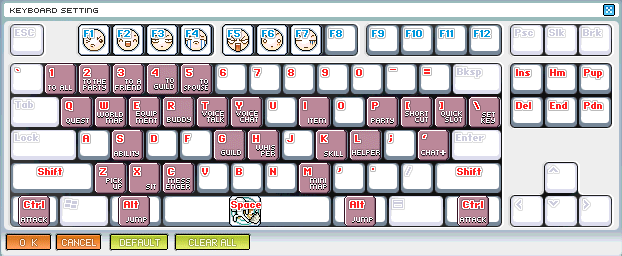
Voice uses the game's own KEYBOARD SETTING (the window from the status bar). It has two new functions: VOICE TALK (hold to talk) and VOICE CHAT (opens and closes the window). New characters get them on T and Y when those keys are free.
- Drag them onto any other key, like any skill or window, and press OK.
- DEFAULT puts VOICE TALK back on T and VOICE CHAT on Y.
- No VOICE TALK key bound? The window says set a talk key in KEYBOARD SETTING, and the launcher's fallback key (`, left of 1) is used instead.
Every VOICE OPTION setting
| TALK TO | Map talks to the players on your map, Channel to everyone on your channel. |
| TALK KEY | Shows the key from KEYBOARD SETTING (T by default). Change it there. |
| OPEN MIC | Talk without holding the key: your mic goes out whenever you speak. The launcher's Voice settings have the sensitivity. |
| MIC / SPEAKER | Your Windows devices. Pick your headset here if the game uses the wrong one. |
| VOLUME / MIC VOLUME | How loud others are for you, and how loud you are for them. |
| STEREO | "Louder when close": map voice gets distance and left/right. Turn it off to hear everyone at the same volume. |
| NOISE FILTER | "Cut echo and noise": Windows' voice processing removes the echo from your speakers, background noise and volume jumps. |
| MIC TEST | "Hear yourself" to check your mic. |
| MUTE MIC / DEAFEN | In the VOICE CHAT window: stop sending your voice / stop hearing everyone. |
The launcher's Settings › Voice chat has the same options outside the game, plus microphone gain up to 300%, open-mic sensitivity and the fallback talk key.